How to get mix feedback from your band without a 60-message group chat
By Ryan Whitten · Updated October 2, 2026
Mix feedback in a group chat goes the same way every time: "sounds great!", "bass feels a bit much?", "which version is this?", and a voice note nobody can find by Thursday. Good band feedback needs four things: a specific question, a timestamp on every note, one list per song, and someone who decides.
Decide who decides, before the first mix goes out
Everyone gets a say; one person gets the final say. That might be whoever is mixing, the songwriter, or a producer the band trusts. Agree on it before anyone hears a mix, because agreeing on it mid-argument about the snare doesn't work.
Ask a specific question with every mix
"Thoughts?" gets you vague answers. "Is the vocal loud enough in the last chorus?" and "Does the new bridge work?" get you useful ones. Tell people what changed since the last version, so they listen for that instead of relitigating everything.
Every note needs a time and a version
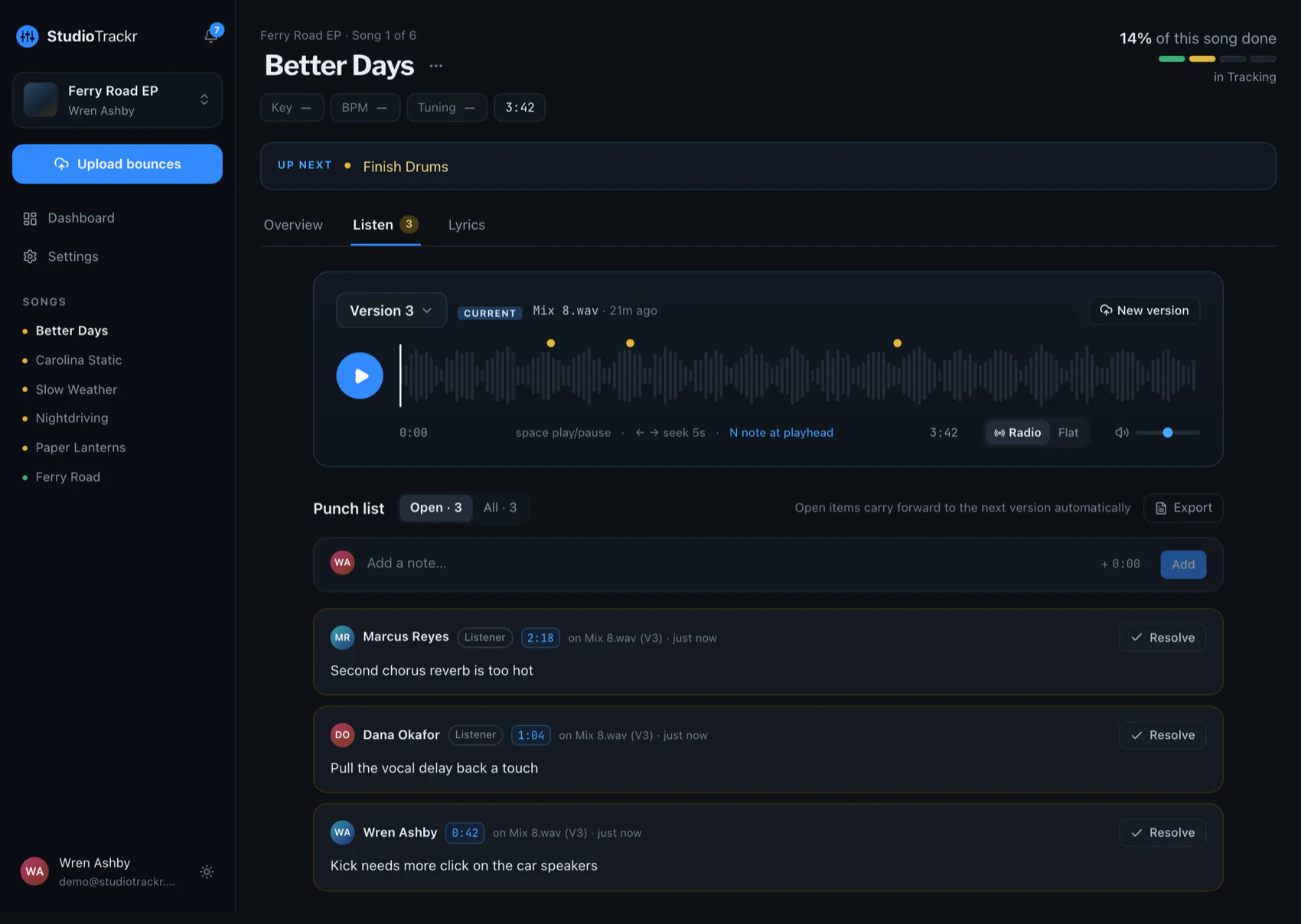
"The guitar's too loud" could mean anywhere in the song, on any of four mixes. "2:41 on v6, the lead guitar covers the vocal" can be fixed in a minute. Ask everyone to write the time with every note, and to say which version they heard.
Keep one list per song, outside the chat
Collect every note for a song in one place, as separate items. The mixer works down the list, marks each one done or explains why not, and bounces the next version. Nothing gets lost in scrollback, and nobody has to repeat themselves.
Listen on the systems people actually use
Ask bandmates to listen where they normally listen: earbuds, the car, a laptop. If a note only shows up on one system, say which one. "Too much low end in the car" and "too much low end on my laptop" are different problems.
Set a limit on rounds
Agree on how many rounds of notes a song gets before the mix is approved. Two or three is plenty. If a disagreement survives that, the person who decides decides, and the band moves on to the next song.
How StudioTrackr handles band feedback
- Invite the band to the project. Each person is an editor, who can update songs and steps, or a listener, who plays mixes and leaves notes. The people you invite never pay for their own plan.
- Notes land at the second. Anyone can tap to leave a note at the playhead, from the web, the iPhone app or CarPlay, and it records the version too.
- One punch list per song. Every note is an item that stays open across new versions until it's resolved, with replies for the back-and-forth.
- Everyone sees the same board, so "where are we on the album?" stops being a question in the chat.
Free includes two listeners on one project of up to four songs. Pro allows up to ten people per project, as editors or listeners.