Using Notion to track an album: what works and what doesn't
By Ryan Whitten · Updated October 2, 2026
Notion can track an album: a database with a row for each song, a property for each stage, and a page per song for lyrics and notes. It's very good at the writing side of an album. It's weaker at the parts that are audio, because an album's real progress happens in bounces, and on Notion's free plan every uploaded file has to be under 5 MB.
How musicians usually set up Notion for an album
Most setups, including many of the templates in Notion's gallery, come down to this:
- A Songs database, one entry per song, with properties for key, tempo and status.
- A board view grouped by status, so songs move from Writing to Recording to Mixing to Mastered.
- A page per song holding lyrics, chord charts, a to-do list and links to the latest mix.
- A release page for artwork, credits, the distributor and the release date.
What Notion is good at
Anything that's words. Lyrics, credits and split sheets, a release plan, pitching notes, a press kit. It's flexible enough to fit any way of working, and it's free for one person. If you already plan your life in Notion, planning the release there makes sense.
Where Notion struggles with an album
The mixes don't fit
On the free plan, every file you upload has to be under 5 MB. A four-minute stereo WAV at 24-bit and 48 kHz is about 70 MB, and even a 320 kbps MP3 of the same song is close to 10. So in practice the mixes live in Dropbox or Google Drive, and Notion holds links to them. Which link is the current mix is something you keep up to date by hand.
A song is in more than one stage at once
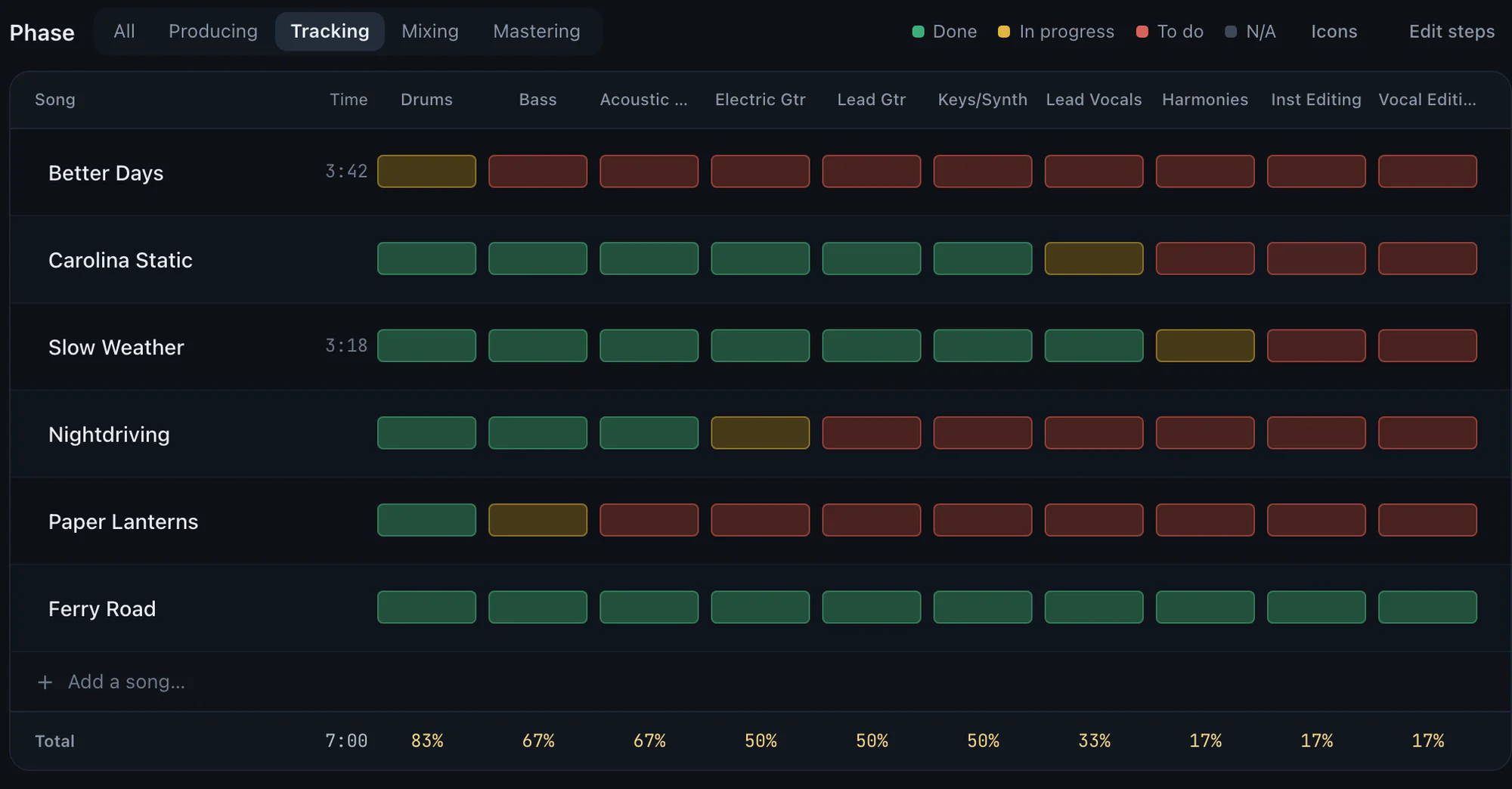
A board view puts each song in one column. But a song on a home-recorded album is rarely in one stage: bass is done, vocals are half-done, harmonies haven't started. You can build that grid in table view, with a checkbox per step, but you'll be writing the formulas for progress yourself, and the board you liked at the start no longer describes the project.
Building the system becomes the work
Notion rewards tinkering. Relations, rollups, templates, dashboards: each is a good evening's work that feels like progress on the album and isn't. If your problem is finishing, a tool you have to design first is a risk.
Generic means you build the music part yourself
Notion is built to fit any project, which also means it knows nothing about an album. There's no idea of a mix version, a phase that's finished when every song's steps are done, or a note that belongs to the second you heard it. You can approximate each one with properties and relations, but you're designing a music tool inside a document tool, and the gaps show as soon as the audio comes in.
Notes aren't tied to the audio
You can write "vocal delay too long in verse two" on a song's page, but not against the second you heard it or the version you heard it on. Three mixes later, nobody knows whether that note is still true.
When Notion is the right tool
Use it for what it's best at: lyrics, credits, the release plan, the press kit. Plenty of people keep the writing and the release in Notion and track the recording and mixing somewhere built for audio.
What StudioTrackr does differently
StudioTrackr is built for the recording and mixing half, and comes with the structure already in place:
- The grid is the default. The Studio Board is songs against steps, four phases, five statuses. Pick the steps your project needs when you create the project, and progress counts itself.
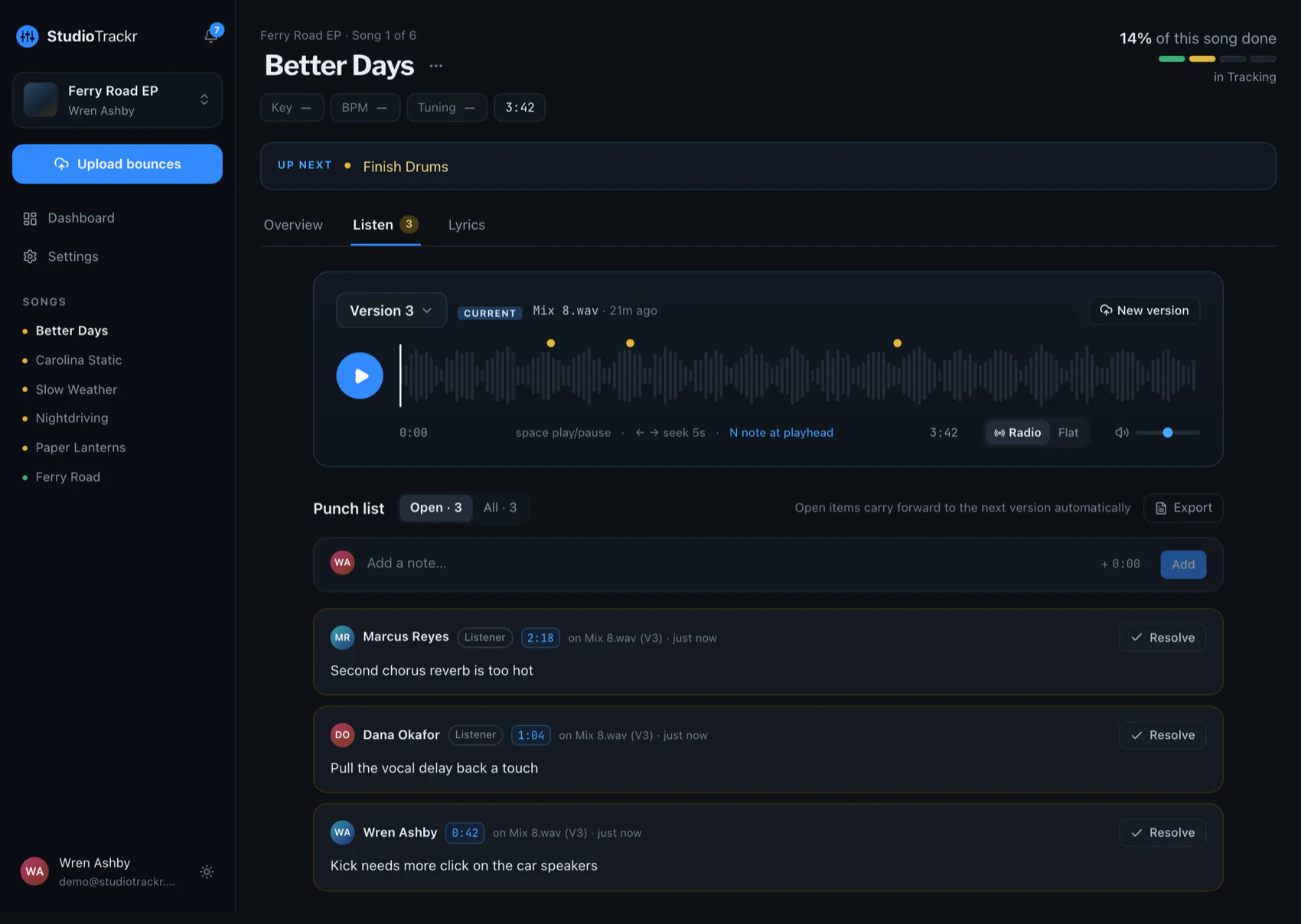
- Audio is the point. Upload a full WAV, or bounce into a folder on your Mac and it arrives as the song's next version. How that works →
- Notes are pinned to the second. Every note knows its version and timestamp, sits on the song's punch list, and stays open until it's resolved.
- It's on your phone and in the car. The iPhone app plays the project in album order, and CarPlay takes notes by voice.
The Free plan runs one project of up to four songs, so you can track one EP there alongside your Notion setup and keep whichever works.