Trello for music production: tracking an album on a kanban board
By Ryan Whitten · Updated October 2, 2026
Trello works for an album when each card is a task: "re-amp the bass on Better Days", "send stems to the mixer". It struggles when each card is a song, because a song on a home-recorded album is usually in several stages at once, and a board can only put it in one list.
The two ways people set up Trello for an album
Lists are stages, cards are songs
Lists for Writing, Tracking, Mixing, Mastering and Done, with a card per song that moves right as it progresses. It looks great on day one. It's also the setup that breaks first, for the reason below.
Lists are songs, cards are tasks
A list per song, with a card for each job left to do on it. This copes with songs being in several stages at once, but there's no view of the project as a whole: you can see what's left on each song, not how far the album is from done.
Most people end up somewhere in between, with song cards that each carry a checklist of steps.
What Trello is good at
It's quick to set up, free for small teams, and very good at shared to-do lists. For a band, Trello is a fine place for gigs, merch, the release checklist and who's booking the rehearsal room.
Where Trello struggles with an album
A song is in one list, but several stages
Bass is done, vocals are half-done, harmonies haven't started. Which list does the card go in? Whatever you choose, the board stops being true, and the real state moves into checklists inside the cards, where you can't see it without opening each one.
There's no progress for the whole project
A checklist shows "4/9" on its card. Nothing adds those up across twelve songs, or tells you which phase is holding the album up.
Mixes are attachments
On Trello's free plan, a file you upload from your computer has to be 10 MB or smaller, and a four-minute WAV is around 70. Paid plans raise the limit to 250 MB a file. Either way each new bounce is another attachment on the card, and which one is the current mix is down to how carefully you name them.
It's built for any project, so it fits none of an album's shape
Trello knows about cards, lists and checklists. It doesn't know what a song, a take, a mix version or a phase is, so every musician rebuilds those from labels and naming conventions, and the board can only ever be as music-aware as the system you design. A tool that already knows an album goes Producing, Tracking, Mixing, Mastering, and that every song has its own versions and notes, starts where your Trello setup would have ended.
Comments aren't tied to the audio
A comment on the card can't point at the second of the mix it's about, or the version. Mix feedback turns into "the bit after the second chorus, on the one from Tuesday".
When Trello is the right tool
Release logistics, band admin, anything that's a list of jobs with owners. Keep using it for those, and track the recording and mixing in something built for songs and audio.
What StudioTrackr does differently
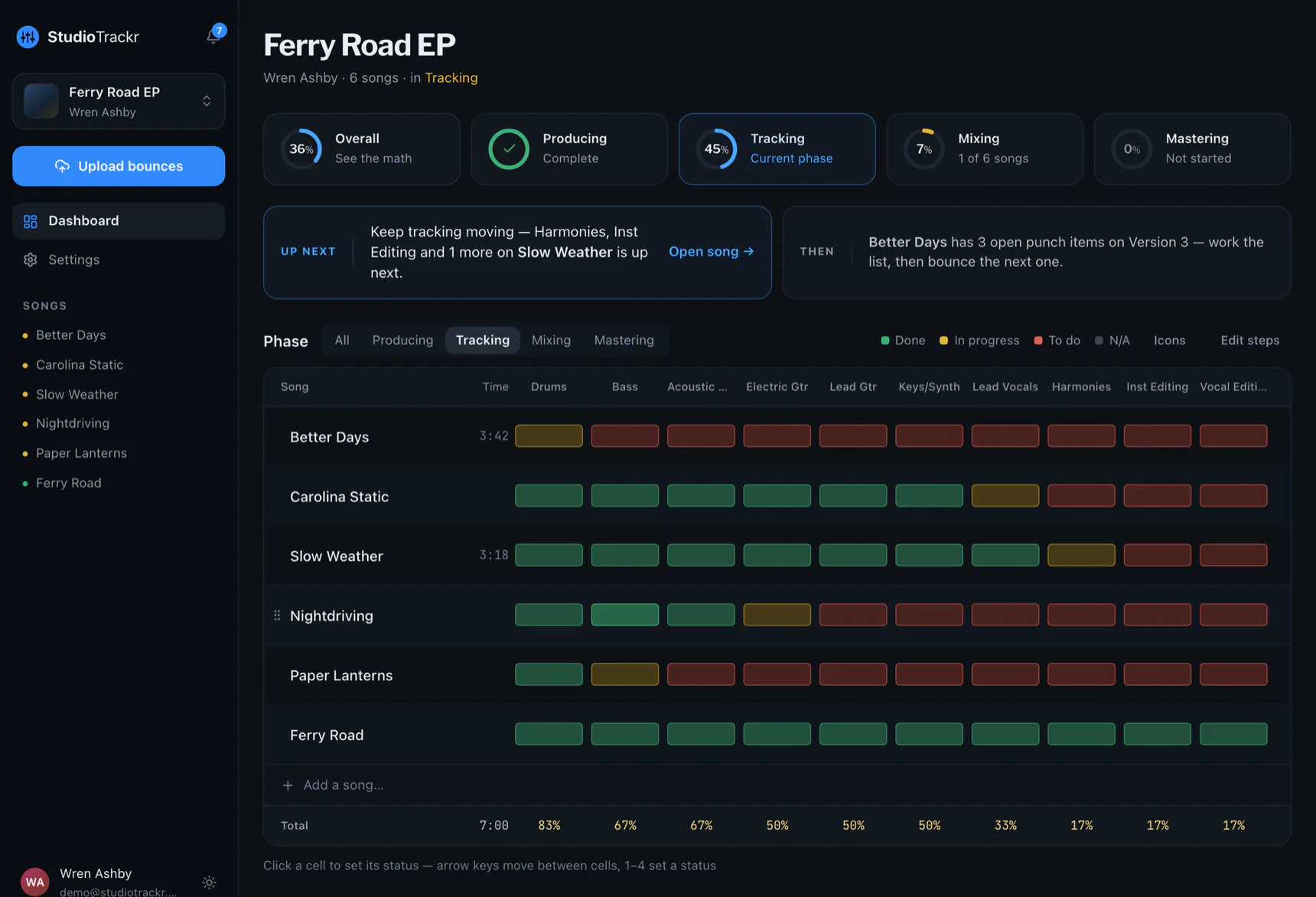
- Songs against steps, not songs in lists. The Studio Board shows every song's status for every step at once, so a song can be done with bass and halfway through vocals, and the board still tells the truth.
- Progress for the whole project. Per phase and overall, counted from the board, with the math one tap away, and an Up Next card that says which steps finish the phase you're in.
- Bounces are versions, not attachments. Bounce into a song's folder on your Mac and it's the song's next version, on your phone. How that works →
- Feedback is pinned to the second. Notes carry their version and timestamp, and stay on the punch list until someone resolves them.
Free runs one project of up to four songs with two listeners invited, and the people you invite never pay for their own plan.