Why your mix sounds different in the car, and how to car-test it properly
By Ryan Whitten · Updated October 2, 2026
Your mix sounds different in the car because a car is a terrible room in useful ways: small, boomy, noisy, with speakers in odd places. That's why it exposes problems your studio hides. The trap is loudness: next to a commercial track, a quieter mix always sounds worse, so a car test that doesn't match levels mostly tells you your mix isn't mastered.
Why the car hears things your studio doesn't
- The low end is exaggerated. A small, sealed cabin boosts the lowest frequencies, so a bass-heavy mix gets boomy and a thin one finally sounds right. Either way, the balance between kick and bass becomes obvious.
- Road noise masks the quiet parts. Anything that only works when it's silent around it, like a soft vocal line or a reverb tail, disappears. If the song depends on it, it's too quiet.
- You're sitting off to the side. The stereo image collapses toward the nearest speaker, which is closer to how most people will hear your music.
- It's how you actually listen. You've heard thousands of songs in that car, so your ears know what normal sounds like there.
The loudness trap
When two versions of a song play at different levels, the louder one almost always sounds better: fuller, brighter, more exciting. Commercial releases are mastered loud. Your mix isn't, and shouldn't be yet. So when you play your mix after a reference track, the gap you hear is mostly level, not mix quality.
Before you judge, match the levels: turn the reference down, or turn your mix up by ear until they feel equally loud. Do the same when you compare two of your own mixes, or you'll keep picking the one you bounced hotter.
How to car-test a mix
- Bounce and get it on your phone before you leave the room. How →
- Use the same car and the same volume every time, so the only thing that changes is the mix.
- Pick one or two reference tracks in the same genre that you know well in that car.
- Play reference, mix, reference, at matched loudness.
- Listen for a few things at a time: the vocal level in the busiest section, kick against bass, harshness in the top end, anything that disappears.
- Note the time, not just the problem. "2:14, guitar swallows the vocal" can be fixed. "Chorus feels off" can't.
- Don't fix anything in the car. Collect the notes, then work through them at the desk next session.
Take notes you can act on
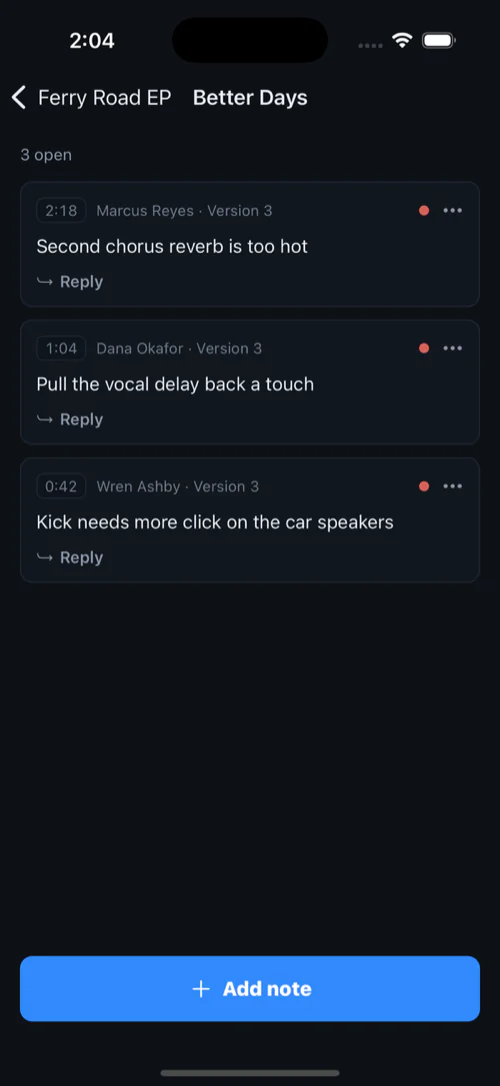
Write each note against the version you heard and the second you heard it, and put them all in one list per song. The next session starts with that list. When an item is fixed, cross it off and bounce again, and the next car test checks the fix. In the car itself, take notes by voice or once you've parked.
How StudioTrackr helps
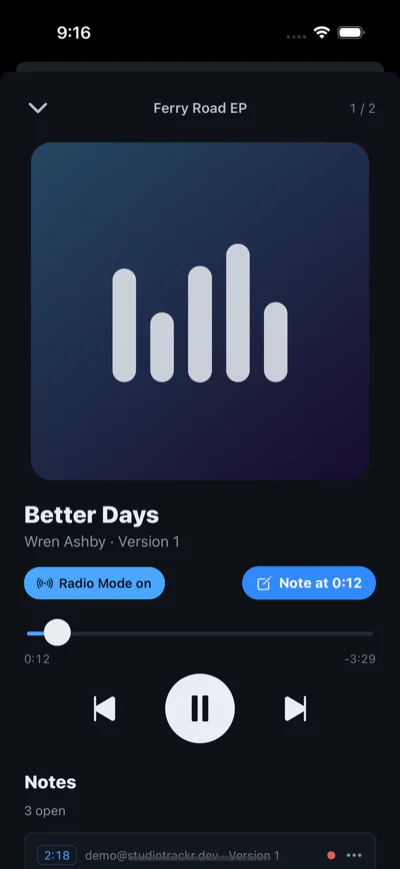
- The mix is already on your phone, and in CarPlay, as soon as you bounce it.
- Radio Mode handles the loudness trap. Every bounce comes with a level-matched, lightly polished copy, so a rough holds its own next to a commercial track and two mixes compare on the music, not the level. Flat is always exactly what left your DAW.
- The note button asks "What's your note?" in CarPlay, listens, and puts what you said on the song's punch list at the exact second.